- Page d'accueil /
- Produits de bureau /
- Électronique de bureau /
- Printers & Accessories /
- Computer Printers /
- Imprimantes à jet d'encre /
- Ink Tank Printers /
- Canon Megatank GX7120 Wireless All-in-One Pri...
0 ratings




Numéro d'article:
35004094
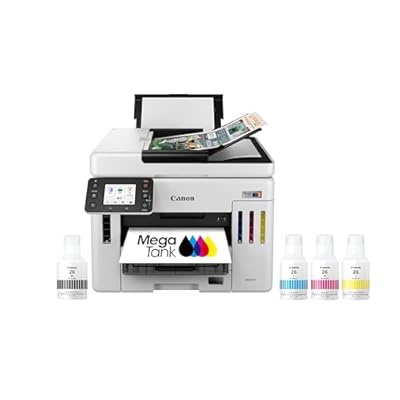
Canon Megatank GX7120 Wireless All-in-One Printer, Print, Copy, Scan and Fax with 2.7" LCD Touch Screen and Auto Document Feeder, White
Numéro d'article:
35004094
TND 2340
Price Details
Excluding Shipping & Custom charges ( Shipping and custom charges will be calculated on checkout )
*All items will import from États-Unis
35%
En rupture de stock
 Importé depuis la boutique USA
Transaction sécurisée
Ubuy s'engage à protéger votre sécurité et votre confidentialité. Notre système avancé de sécurité des paiements garantit la confidentialité en chiffrant vos informations lors de la transmission grâce aux protocoles AES (Advanced Encryption Standards) et SSL (Secure Socket Layer). Vos coordonnées de paiement sont 100 % sécurisées car nous ne partageons pas vos informations de paiement avec des vendeurs tiers.
nos meilleurs partenaires logistiques


Save up to 80% compared to laser with our Wireless MegaTank All-in-One Printer!

Livraison
rapide

Retour
gratuit*

Emballage sécurisé

Produits 100 % originaux

Conformité PCI DSS

Certifié ISO 27001


Note: Step Down Voltage Transformer required for using electronics products of États-Unis store (110-120). Recommended power converters Acheter maintenant.


Ce qui se démarque
Impression économique
Revolutionary MegaTank system allows for an exceptional yield of up to 6,000 color pages, significantly reducing overall printing costs compared to traditional cartridges.
Fonctionnalité polyvalente
All-in-one capabilities including print, copy, scan, and fax enhance productivity for home offices, catering to diverse business needs in a single, compact device.
Seamless Connectivity
Wireless connectivity options including Wi-Fi and mobile printing ensure hassle-free access and convenience, allowing users to print from anywhere using smart devices.
Détails du produit
- Up to 2 years of ink included in the box.Claim of up to two (2) years of ink based on average monthly document print volumes of 200 pages continuous printing using 'default printing mode'.
- EASY SETUP Get running in just a few minutes thanks to a streamlines and easy setup process out of the box.
- 2.7” LCD TOUCH SCREEN Get the job done easy with an intuitive and easy to use 2.7” touchscreen LCD.
- WIRELESS CONNECT Easy Wi-Fi setup in minutes. Connect to Wi-Fi without the need for a computer
- SPACE SAVING DESIGN Not only are the GX Series printers packed with features, they’re also designed small to fit your workspace
| Printer Type | Jet d'encre |
| Autres caractéristiques spéciales du produit | Display Screen |
| Printer Output Type | Couleur |
| Poids de l'article | 28.6 Pounds (12.97 kg) |
| Dimensions de l'article D x L x H | 15.8"D x 16.2"W x 12.4"H (40.1 x 41.1 x 31.5 cm) |
| Print media | Paper (plain) |
| Scanner Type | Automatic Document Feeder |
| Maximum Copy Speed Black and White | 24 ppm |
| Durée de disponibilité des pièces de rechange de l'UE | 1 Years |
| Couleur d'encre | Cyan, Magenta, Yellow, Black |
| Additional Printer Functions | All In One |
| Number of Trays | 1 |
| Résolution | 600 x 600 |
| Type d'affichage | LCD |
| Maximum Media Size | US #10 |
| Maximum Sheet Capacity | 50 |
| Taille du papier | 4” x 6”, 5” x 5” (Square), 5” x 7”, 7” x 10”, 8” x 10”, Letter (8.5” x 11”), Legal (8.5” x 14”), U.S. #10 Custom Size: Width: 3.5” - 8.5” / Length: 5” x 47” |
| Output sheet capacity | 50 |
| Printer Connectivity Type | Wi-Fi |
| Dual-sided printing | Non |
| Duplex | Automatique |
| Marque | Canon |
| Nom du modèle | MAXIFY GX7120 |
| Numéro de modèle | 6880C002 |
| Média intégré | Ink Bottles |
| Model Series | GX |
| Utilisations spécifiques pour le produit | Bureau |
| UPC | 013803381221 |
| Fabricant | Canon |
| Nom du type d'article | Inkjet Printer |
| Color Pages per Minute | 15.5 ppm |
| B&W Pages per Minute | 24 ppm |
| Couleur | Blanc |
| Maximum print Resolution Color | 4800 x 1200 dpi |
| Maximum Print Resolution Black and White | 600 x 600 dpi |
| Maximum Copy Resolution Color | 4800 x 1200 dpi |
| Maximum Copy Resolution Black and White | 600 dpi |
| Technologie de connectivité | Wi-Fi |
| Printing Technology | Jet d'encre |
| Caractéristique spéciale | Display Screen |
| Printer Output | Couleur |
| Maximum Print Speed (Color) | 15.5 ppm |
| Max Printspeed Monochrome | 24 ppm |
À qui est-ce destiné ?

-
Propriétaires de petites entreprises
Ideal for small businesses needing high-volume printing at low cost with versatile printing options and fast performance.
-
Bureaux à domicile
Perfect for remote workers who require a multifunction printer for documents, scanning, and occasional faxing.
-
Utilisateurs soucieux de leur budget
Great for users looking to save on ink costs with the MegaTank system, reducing long-term printing expenses.

-
Utilisateurs occasionnels
Not ideal for infrequent users, as initial setup and maintenance may be excessive for occasional print jobs.
-
High-Quality Photo Printing
May not meet standards for professional photographers needing superior color accuracy and print quality.
-
Espaces Compacts
Its size makes it less suitable for small apartments or workspaces where desk space is limited.
DESCRIPTION DU PRODUIT
Vous avez une question ? Chattez avec nous
Questions et réponses des clients
-
question:
What are the key features of the Canon MAXIFY GX7021 printer?
répondre: The Canon MAXIFY GX7021 is a powerful all-in-one printer designed for small offices. Key features include a MegaTank ink system that offers high-volume printing, wireless connectivity for seamless mobile printing, and versatile media handling. This printer can print, scan, copy, and fax, making it ideal for diverse office tasks. Additionally, it supports multiple paper sizes and types, ensuring that you can address a variety of printing needs, from documents to vibrant presentations. -
question:
How does the MegaTank system work in the GX7021?
répondre: The MegaTank system in the Canon MAXIFY GX7021 uses high-capacity ink tanks instead of traditional cartridges. This allows you to print thousands of pages before needing a refill, significantly reducing printing costs. The system features easy-to-fill ink reservoirs that help minimize mess while providing high-quality prints. It’s particularly beneficial for businesses that require frequent and high-volume printing, as it enhances productivity and reduces downtime spent on ink replacement. -
question:
Is the Canon MAXIFY GX7021 compatible with mobile devices?
répondre: Yes, the Canon MAXIFY GX7021 offers robust compatibility with mobile devices. It supports various mobile printing solutions, including Apple AirPrint, Google Cloud Print, and the Canon PRINT app. This means you can print documents and images directly from your smartphone or tablet without needing a computer. For businesses on the go or those working remotely, this feature ensures that you can print important documents quickly and conveniently, enhancing your workflow. -
question:
What types of media can the GX7021 print on?
répondre: The Canon MAXIFY GX7021 is versatile in handling various media types. It can print on plain paper, photo paper, envelopes, and even labels, accommodating different business needs. Additionally, it supports multiple paper sizes, including letter, legal, and custom sizes. This flexibility makes it suitable for producing everything from standard business reports to professional marketing materials, allowing businesses to achieve diverse printing objectives efficiently. -
question:
What is the print speed of the Canon MAXIFY GX7021?
répondre: The Canon MAXIFY GX7021 boasts impressive print speeds, with the ability to print up to 24 pages per minute for black and white documents and 15.5 pages per minute for color documents. This fast printing capability is ideal for small offices that require high productivity and quick turnaround times on printed materials. Businesses involved in time-sensitive projects will particularly appreciate the efficiency this printer brings to their workflows. -
question:
Can the GX7021 print borderless photos?
répondre: Yes, the Canon MAXIFY GX7021 is capable of printing borderless photos. This feature allows you to create stunning photo prints without the traditional borders, making your images more visually appealing. Whether you're producing promotional materials or personal keepsakes, borderless printing ensures that your photos have a polished, professional look. This can be particularly useful for businesses that want to impress clients with high-quality marketing materials or product images. -
question:
What scanning capabilities does the GX7021 have?
répondre: The Canon MAXIFY GX7021 features an automatic document feeder (ADF) for scanning, copying, and faxing, allowing for efficient handling of multi-page documents. It supports both color and black-and-white scanning, providing high-resolution scans that are perfect for archiving and sharing documents digitally. This capability is essential for small offices that need to digitize paperwork quickly, keeping workflows streamlined and organized, ultimately enhancing productivity. -
question:
How do I set up the Canon MAXIFY GX7021?
répondre: Setting up the Canon MAXIFY GX7021 is a straightforward process. After unboxing, connect the printer to your Wi-Fi network using the control panel. Next, fill the MegaTank ink tanks according to the instructions and install the printer driver on your computer or mobile device. The printer guides you through the setup process via an intuitive display. With proper setup, you can start printing, scanning, or copying within minutes, allowing your business to get up and running efficiently. -
question:
What is the energy efficiency of the Canon MAXIFY GX7021?
répondre: The Canon MAXIFY GX7021 has been designed with energy efficiency in mind. It meets Energy Star qualifications, consuming less energy during operation and when in idle mode. This not only helps reduce environmental impact but also lowers energy costs for businesses. Choosing an energy-efficient printer like the GX7021 is a smart long-term investment, particularly for organizations committed to sustainability while maintaining high-performance printing capabilities. -
question:
Where can I buy the Canon MAXIFY GX7021 Wireless MegaTank Small Office All-in-One Printer?
répondre: You can buy the Canon MAXIFY GX7021 Wireless MegaTank Small Office All-in-One Printer from Ubuy in Tunisia. Ubuy offers a variety of options for purchasing this printer, ensuring that you can find the right fit for your small office needs. Their platform provides an easy online shopping experience, making it convenient to get essential office equipment delivered directly to your location.
Canon Ink Tank Printers Editorial Review


The Canon Maxify GX7021 is an all-in-one printer. It has a USB port but no memory slot. The GX7020 can accommodate legal-size paper but has to be fed through the back feeder, only a few sheets at a time. It uses standard US 120-volt input. It allows copying legal paper size documents, but the ability to stack 40-50 coin envelopes to print at the same time is unknown. The GX7020 has a fax, but it has not been used as faxing is outdated. As for printer reviews, one customer had issues with error code 5040, and the printer experienced white lines after 12 months of use. Still, another indicated that it worked well, and the ink tanks last longer than expected. One customer likes that the ink does not have to be changed frequently, but the wireless connectivity is unreliable, and it may not be worth its high price. Another complains that the scanning utility is outdated, and it is overpriced for being marketed as a business printer.
Avis et évaluations clients
454 évaluations des clients
-
5 étoile
63%
-
4 étoile
14%
-
3 étoile
6%
-
2 étoile
4%
-
1 étoile
13%
Donnez votre avis sur ce produit
Partagez votre avis avec d'autres clients
Avantages
- Allows copying of legal paper size documents
- Ink tanks last longer than expected
- Duplex printing and duplex scanning
Les inconvénients
- May not be worth its high price
Historique des prix du produit
Informations importantes
- Limitations : Pour les produits expédiés à l'international, veuillez noter que toute garantie du fabricant peut ne pas être valide ; les options de service du fabricant peuvent ne pas être disponibles ; les manuels, instructions et avertissements de sécurité des produits peuvent ne pas être dans les langues du pays de destination ; les produits (et les matériaux qui les accompagnent) peuvent ne pas être conçus conformément aux normes, spécifications et exigences d'étiquetage du pays de destination ; et les produits peuvent ne pas être conformes à la tension et aux autres normes électriques du pays de destination (nécessitant l'utilisation d'un adaptateur ou d'un convertisseur le cas échéant). Il incombe au destinataire de s'assurer que le produit peut être importé légalement dans le pays de destination. En cas de commande auprès d'Ubuy ou de ses filiales, le destinataire est l'importateur officiel et doit se conformer à toutes les lois et réglementations du pays de destination.
- Tous les produits listés sur Ubuy ne sont pas à vendre, Ubuy étant un moteur de recherche mondial. Les produits sont soumis aux réglementations en matière d'exportation et de commerce.
TND 2340
Currently unavailable.
We don't know when or if this item will be back in stock.
This item is not restrict in my country.(Please click on above link if this item is not restrict in your country, So our team will review and allow.)
Transaction sécurisée
Ubuy s'engage à protéger votre sécurité et votre confidentialité. Notre système avancé de sécurité des paiements garantit la confidentialité en chiffrant vos informations lors de la transmission grâce aux protocoles AES (Advanced Encryption Standards) et SSL (Secure Socket Layer). Vos coordonnées de paiement sont 100 % sécurisées car nous ne partageons pas vos informations de paiement avec des vendeurs tiers.
nos meilleurs partenaires logistiques
Livraison transfrontalière la plus rapide
Caractéristiques et avantages
- Includes up to 2 years of ink at no extra cost.
- Print up to 6,000 black & white pages with one set of inks.
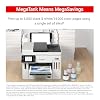
- Produce up to 14,000 color pages using a single set of inks.
- Features a 2.7” LCD Color Touchscreen for easy operation.
- Supports auto 2-sided printing for efficient use of paper.
- Comes with a 50-sheet 1-Pass Auto Document Feeder for quick scanning.