0 ratings






Numéro d'article:
496095
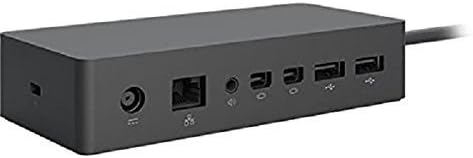
Microsoft Surface Dock (Pd9-00003),Black
Numéro d'article:
496095
TND 429
Price Details
Excluding Shipping & Custom charges ( Shipping and custom charges will be calculated on checkout )
*All items will import from États-Unis
33%
En stock
 Importé depuis la boutique USA
QTY:
Commandez maintenant et recevez votre commande aux alentours du Vendredi, Juin 26
Transaction sécurisée
Ubuy s'engage à protéger votre sécurité et votre confidentialité. Notre système avancé de sécurité des paiements garantit la confidentialité en chiffrant vos informations lors de la transmission grâce aux protocoles AES (Advanced Encryption Standards) et SSL (Secure Socket Layer). Vos coordonnées de paiement sont 100 % sécurisées car nous ne partageons pas vos informations de paiement avec des vendeurs tiers.
nos meilleurs partenaires logistiques


Transform your surface into a desktop PC by plugging in your dock with the surface connect cable.

Livraison
rapide

Retour
gratuit*

Emballage sécurisé

Produits 100 % originaux

Conformité PCI DSS

Certifié ISO 27001


Note: Step Down Voltage Transformer required for using electronics products of États-Unis store (110-120). Recommended power converters Acheter maintenant.


Ce qui se démarque
Multiple Ports
Equipped with various ports, the Surface Dock allows seamless connectivity to multiple devices like monitors, keyboards, and external drives, enhancing productivity without cable clutter.
Charge rapide
The Surface Dock provides quick charging capabilities, ensuring your Surface device stays powered during intense work sessions, which is essential for professionals on the go.
Conception élégante
With its modern black finish and compact size, the Microsoft Surface Dock complements any workspace while ergonomically maintaining functionality, making it an attractive addition to your setup.
Détails du produit
- Compatibility: Surface go, surface laptop, surface laptop 2, surface pro, surface pro 3, surface pro 4,surface pro 6, surface book, surface book 2
- 2x Mini display ports, 1x Gigabit Ethernet port
- 4 USB 3.0 ports, 1x audio out port
- Magnetic surface connect cable. Transform your surface into a desktop PC by plugging in your dock with the surface connect cable. External power supply
- High speed data transferring
| Interface matériel | Ethernet |
| Appareils compatibles | Microsoft Surface Pro 3 |
| Total des ports USB | 4 |
| Number of Ports | 4 |
| Nombre total de ports HDMI | 2 |
| Compatibilité avec la maison intelligente | non compatible avec la maison intelligente |
| Dimensions de l'article L x W x H | 5.12"L x 1.18"W x 2.36"H (13 x 3 x 6 cm) |
| Poids de l'article | 2.6 Pounds (1.18 kg) |
| Couleur | Noir |
| Marque | Microsoft |
| Numéro d'identification du commerce mondial | 00885370996340 |
| UPC | 885370996340 |
| Fabricant | Microsoft |
| Numéro de modèle | PD9-00003 |
| Numéro de pièce du fabricant | PD9-00003 |
| Nombre d'unités | 1.0 Compte |
| Dimensions du produit (L x W x H) | 5.12"L x 1.18"W x 2.36"H (13 x 3 x 6 cm) |
| Total HDMI Ports | 2 |
| Nombre d'articles | 1 |
| Poids du colis | 3 livre |
À qui est-ce destiné ?

-
Travailleurs à distance
Ideal for remote workers needing multiple connections and quick access to peripherals for better productivity.
-
ÉTUDIANTS
Perfect for students using Surface devices for presentations and who need to connect to projectors and monitors.
-
Bureaux à domicile
Great for home office setups, allowing seamless switching between laptop and desktop peripherals for enhanced workflow.

-
Utilisateurs occasionnels
Not suitable for casual users who require basic functionality without the need for multiple display connections.
-
Voyageurs
Not ideal for frequent travelers due to its stationary design, making it less portable for on-the-go users.
-
Conscientieux du budget
May not be suitable for budget-conscious individuals as it can be considered expensive for basic docking needs.
DESCRIPTION DU PRODUIT
Vous avez une question ? Chattez avec nous
Questions et réponses des clients
-
question:
What are the main features of the Microsoft Surface Dock (Pd9-00003)?
répondre: The Microsoft Surface Dock (Pd9-00003) features multiple ports including two Mini DisplayPort outputs, multiple USB 3.0 ports, and an Ethernet connection. This allows users to connect dual 4K monitors, charge your Surface device, and access high-speed internet all through a single dock. It enhances productivity, especially in multi-tasking environments. For instance, professionals working from home can seamlessly transition from a laptop setup to a desktop environment by simply connecting their Surface device to the dock. -
question:
Is the Microsoft Surface Dock compatible with all Surface devices?
répondre: The Microsoft Surface Dock is designed specifically to work with Surface devices equipped with the Surface Connect port. This includes models like the Surface Pro 4, Surface Book, Surface Laptop, and newer models. Compatibility ensures that users can easily power their devices while connecting to peripherals. As an example, a Surface Pro user can enjoy a desktop experience by using the dock to connect external monitors and USB devices without any hassle. -
question:
How does the docking station improve productivity?
répondre: By utilizing the Microsoft Surface Dock, users can significantly boost productivity by setting up a multi-monitor workstation, which allows for better organization of applications and windows. The dock supports dual 4K displays, enabling users to have expansive screen real estate for tasks like graphic design or programming. For instance, a graphic designer can keep design tools on one screen and previews on another, streamlining their workflow. -
question:
Can I charge my Surface device while using the dock?
répondre: Yes, the Microsoft Surface Dock provides power to your Surface device while connected, ensuring that you can work uninterrupted. It eliminates the need for separate charging cables and also provides ample power to run connected peripherals. For example, using the dock during a video conference lets users stay fully powered while accessing cameras and microphones plugged into the dock. -
question:
What connectivity options does the Surface Dock support?
répondre: The Surface Dock offers various connectivity options, including USB 3.0 ports for high-speed data transfer, a Gigabit Ethernet port for reliable internet access, and Mini DisplayPort outputs for connecting monitors. These diverse options make it suitable for different professional setups, allowing users to customize their workspace. A typical office scenario would involve connecting a printer and external drives through the USB ports while maintaining a stable internet connection. -
question:
What is the design of the Microsoft Surface Dock like?
répondre: The Microsoft Surface Dock has a sleek, minimalistic design that complements Surface devices aesthetically. It is compact, allowing it to fit on most desks without taking up much space. This design not only enhances the visual appeal of a workspace but also promotes organized cable management. In a professional setting, this can lead to a cleaner and more efficient work environment. -
question:
How do I set up the Microsoft Surface Dock?
répondre: Setting up the Microsoft Surface Dock is straightforward: simply plug the dock into a power outlet and connect your Surface device using the Surface Connect cable. From there, you can add peripherals like keyboards, mice, and monitors through the available ports. For users transitioning from a laptop to a desktop experience, this simplicity allows for quick adjustments without technical setup challenges. -
question:
Does the Surface Dock support audio output?
répondre: Yes, the Microsoft Surface Dock supports audio output through connected displays or speakers. When attaching monitors equipped with built-in speakers, audio can be routed seamlessly, making it ideal for video conferencing or media playback. This feature enhances the overall experience for presentations or virtual meetings, as users can maintain sound quality without additional complications. -
question:
Are there any performance limitations when using the Surface Dock?
répondre: While the Surface Dock is highly capable, performance can vary based on the connected Surface device and the number of peripherals used simultaneously. For instance, while running dual 4K monitors, heavy applications may cause strain on lower-end Surface models. Users should check individual specifications and optimize their setups accordingly to ensure the best experience. -
question:
Where can I buy the Microsoft Surface Dock (Pd9-00003)?
répondre: You can purchase the Microsoft Surface Dock (Pd9-00003) from Ubuy in Tunisia. Ubuy offers a user-friendly shopping experience with a variety of options for quick and convenient purchasing tailored to customers in your region.
Microsoft Docking Stations Editorial Review


The Microsoft Surface Dock PD9-00003 allows users to connect their Surface Pro 3 or 4 tablets to multiple monitors and peripheral devices through the charging port. The dock also charges the tablet when in use and connects with 110-volt power. Users are able to run two 4K monitors at 30Hz, or one 4K monitor at 60Hz while connected to the dock and an additional monitor connected through the Surface Pro 4’s built-in charging port. The dock is not compatible with the Surface 2, but is compatible with the Surface Book and the Surface Go. Overall, customer reviews indicate that this product works well and is easy to set up, however, some have expressed disappointment with the lack of specific ports, such as a USB Type-C. **
Avis et évaluations clients
4465 évaluations des clients
-
5 étoile
76%
-
4 étoile
11%
-
3 étoile
5%
-
2 étoile
2%
-
1 étoile
6%
Donnez votre avis sur ce produit
Partagez votre avis avec d'autres clients
Avantages
- Works as advertised
- Easy plug-and-play setup
- Charges the Surface Pro while in use
- Eliminates wire clutter
- Compatible with the Surface Pro 3, 4, Book, and Go
Les inconvénients
- Limited to 30Hz when running two 4K monitors
Historique des prix du produit
Informations importantes
- Limitations : Pour les produits expédiés à l'international, veuillez noter que toute garantie du fabricant peut ne pas être valide ; les options de service du fabricant peuvent ne pas être disponibles ; les manuels, instructions et avertissements de sécurité des produits peuvent ne pas être dans les langues du pays de destination ; les produits (et les matériaux qui les accompagnent) peuvent ne pas être conçus conformément aux normes, spécifications et exigences d'étiquetage du pays de destination ; et les produits peuvent ne pas être conformes à la tension et aux autres normes électriques du pays de destination (nécessitant l'utilisation d'un adaptateur ou d'un convertisseur le cas échéant). Il incombe au destinataire de s'assurer que le produit peut être importé légalement dans le pays de destination. En cas de commande auprès d'Ubuy ou de ses filiales, le destinataire est l'importateur officiel et doit se conformer à toutes les lois et réglementations du pays de destination.
- Tous les produits listés sur Ubuy ne sont pas à vendre, Ubuy étant un moteur de recherche mondial. Les produits sont soumis aux réglementations en matière d'exportation et de commerce.
TND 429
Commandez maintenant et recevez votre commande aux alentours du Vendredi, Juin 26
This item is not restrict in my country.(Please click on above link if this item is not restrict in your country, So our team will review and allow.)
QTY:
Transaction sécurisée
Ubuy s'engage à protéger votre sécurité et votre confidentialité. Notre système avancé de sécurité des paiements garantit la confidentialité en chiffrant vos informations lors de la transmission grâce aux protocoles AES (Advanced Encryption Standards) et SSL (Secure Socket Layer). Vos coordonnées de paiement sont 100 % sécurisées car nous ne partageons pas vos informations de paiement avec des vendeurs tiers.
nos meilleurs partenaires logistiques
Livraison transfrontalière la plus rapide
Caractéristiques et avantages
- Connectivity with 4 USB 3.0 ports, 2x Mini display ports, 1x Gigabit Ethernet port, and 1x audio out port.
- Compatible with a range of Microsoft Surface devices.
- External power supply.
- High speed data transferring.
- Magnetic surface connect cable.
- Transforms your Surface device into a desktop PC.